Wrap Label Sizer
A label page at the exact wrap size for your container
What it does
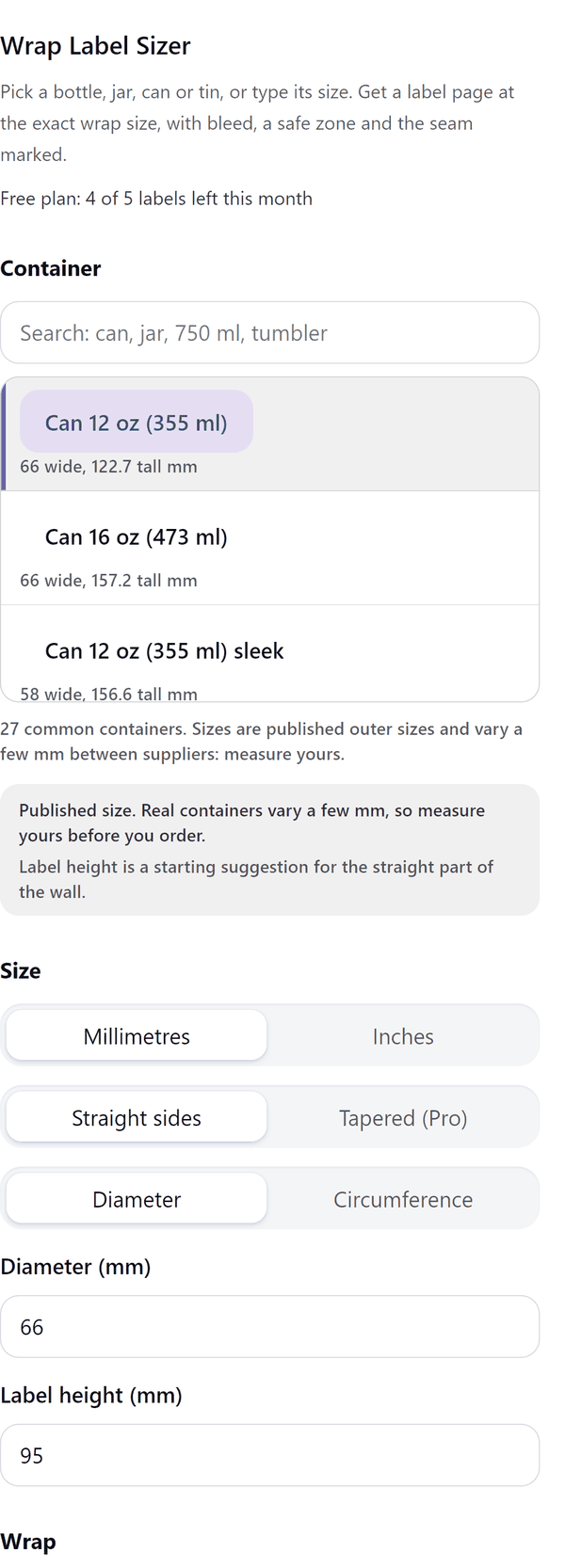
- Works out the flat label size from the container: a list of 27 common containers, or your own diameter or circumference and height
- Lets you choose full wrap, 3/4 or front only, an overlap or a seam gap, a bleed and a safe margin
- Shows a preview with the trim line, the safe zone and the seam marked
- Adds a label page at the exact size plus bleed, and shows the label size in millimetres and inches to paste into a printer order
- Pro: labels for tapered containers with the curved flat shape, front and back labels, a print sheet with cut marks and a cut-line page
- Container sizes are published sizes and vary a little between suppliers, so the panel asks you to measure yours
How to use it
- Open a design and open Wrap Label Sizer from the Apps tab.
- Under Container search for your container, or choose Diameter or Circumference and type your own size and the Label height.
- Choose how far round it goes under Wrap, then check Overlap, Bleed and Safe margin.
- Check the Preview and the Summary. Measure your real container against the label size.
- Press Add label page. A page at the label size plus bleed is added to your design.
Free and Pro
Plan limits reset each calendar month (UTC). Pro is billed through Polar.
| Free | Pro | |
|---|---|---|
| Labels a month | 5 | Unlimited |
| Straight sided containers | Yes | Yes |
| Tapered containers (tumblers, cups) | No | Yes |
| Front and back labels | No | Yes |
| Print sheet with cut marks (A4, Letter, SRA3) | No | Yes |
| Cut-line page | No | Yes |
| Price | $0 | $5 per month or $35 per year |
Manage your Pro licence
You get a licence key by email after you buy Pro. Paste it into the app and press Activate licence. To use the key on another Canva account, press Deactivate this licence first. To restore Pro after a reinstall or on a new device, activate the same key again. To cancel, use the link in your Polar receipt email. Full steps: buying, restoring and managing Pro.
FAQ
Are the container sizes exact?
They are published outer sizes and real containers vary by a few millimetres between suppliers. Measure yours before you print.
Which containers are tapered?
Tumblers, cups and similar containers that are wider at one end. Tapered labels are a Pro option and are drawn with a curved flat shape.
What is the overlap?
How much one end of a full wrap label covers the other where they meet. A seam gap leaves a small space instead.
How do I order the label?
Use the Summary: it gives the label size with bleed in millimetres and inches to paste into a printer order.
Does my design leave my computer?
No. The label page is made in your browser. Our server only counts your monthly labels.
What if the label is very large?
Canva pages are limited in size. A very large label is scaled down and the panel tells you the print percentage to use.
How do I get help?
Email [email protected] with the app name and a short description of what happened. Do not send your full licence key.
What data does this app keep?
See the Privacy Policy. In short: designs and images stay in your browser; our server keeps your Canva user and brand ids, monthly usage counts and your licence status.