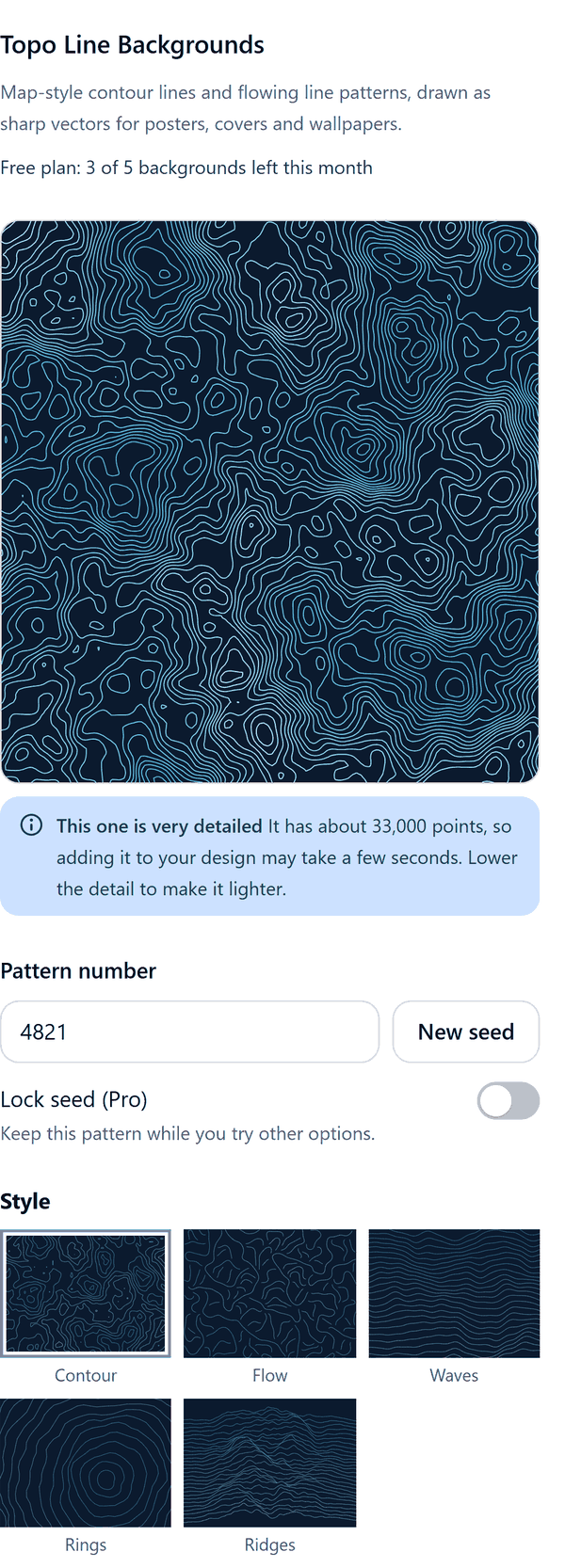
Topo Backgrounds
Map-style contour line backgrounds from a pattern number
What it does
- Draws map-style contour lines from a pattern number, in a palette you pick, with Detail and Feature size controls and a live preview
- Adds the result to your design as one image drawn as vector lines, so the lines stay sharp at any size. The colour behind the lines is added as a separate shape, as the panel describes
- Warns you when a pattern is very detailed and may take a few seconds to add; lowering Detail makes it lighter
- Because the lines go in as an image, you may need to send the image to the back if you want to put text on top
- Pro: flow, wave, ring and ridge styles, filled elevation bands, your own colours, line width, a transparent background, poster shapes and a locked seed
How to use it
- Open a design and open Topo Line Backgrounds from the Apps tab.
- Choose a Style and Colours. Type a Pattern number, or press New seed for a different pattern.
- Set Detail and Feature size and look at the Preview. Under Shape choose Match this page.
- Press the Add to design button. The lines are added as an image. If you want text on top, send the lines to the back in Canva.
Free and Pro
Plan limits reset each calendar month (UTC). Pro is billed through Polar.
| Free | Pro | |
|---|---|---|
| Backgrounds a month | 5 | Unlimited |
| Styles | Contour lines | Also flow, waves, rings and ridges |
| Colours | 4 ready-made palettes | Also your own colours |
| Filled elevation bands | No | Yes |
| Line width | Fixed | Your choice |
| Transparent background | No | Yes |
| Shape | Your current page | Also A3 and 18 x 24 in poster |
| Detail, feature size, pattern number, New seed | Yes | Yes |
| Lock seed | No | Yes |
| Price | $0 | $5 per month or $35 per year |
Manage your Pro licence
You get a licence key by email after you buy Pro. Paste it into the app and press Activate licence. To use the key on another Canva account, press Deactivate this licence first. To restore Pro after a reinstall or on a new device, activate the same key again. To cancel, use the link in your Polar receipt email. Full steps: buying, restoring and managing Pro.
FAQ
Why do I have to send the lines to the back?
The lines are added as one image on top of what is already on the page. Send the lines to the back if you want to put text or other things on top of them.
What is the pattern number?
The number the pattern is drawn from. The same number with the same settings gives the same pattern. New seed picks another number.
Can I add only the lines?
Yes, with Pro. Transparent background adds only the lines, so they can go over a photo or a colour.
Why did adding a background take a few seconds?
A very detailed pattern has many points. The panel warns you, and a lower Detail makes the background lighter.
Can I look at Pro options on the free plan?
Yes. Pro styles and options show in the preview. Adding a background that uses them needs Pro.
Does my work leave my computer?
No. The lines are made in your browser and added to your design through Canva. Our server only counts your monthly backgrounds.
How do I get help?
Email [email protected] with the app name and a short description of what happened. Do not send your full licence key.
What data does this app keep?
See the Privacy Policy. In short: designs and images stay in your browser; our server keeps your Canva user and brand ids, monthly usage counts and your licence status.