Numbered Tickets
A run of numbered tickets from one ticket design
What it does
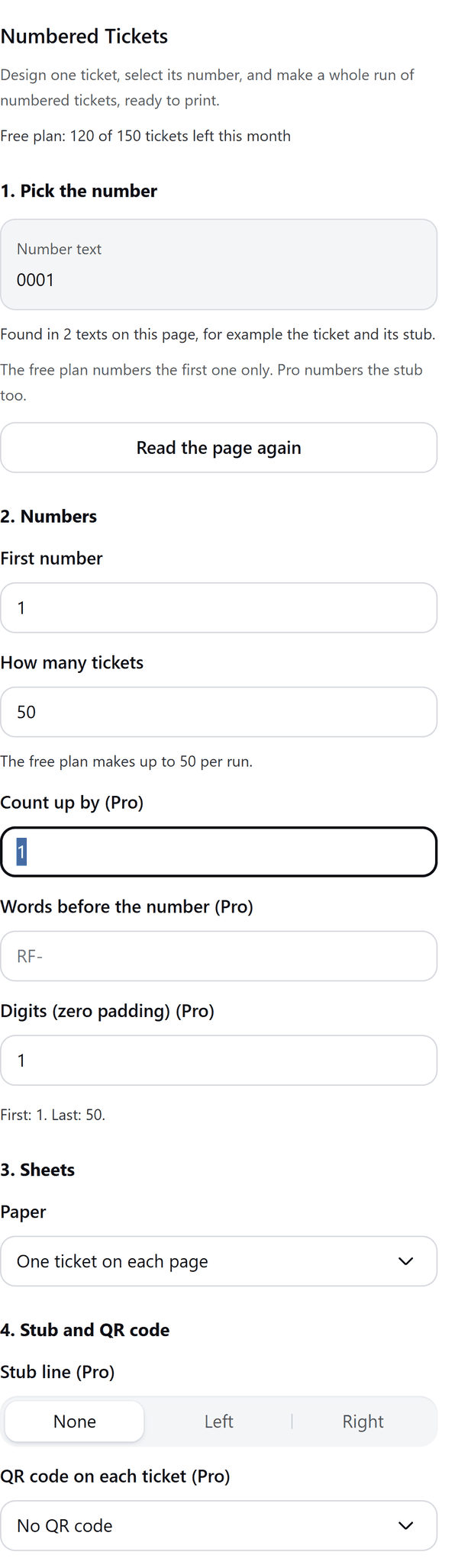
- Reads the number text you select on your ticket page, for example 001 or No. 0001, and swaps it on a copy of the page for each ticket
- Lets you set the first number and how many tickets, and shows the first and last number before you start
- Adds one ticket on each page, or on Pro puts several tickets on US Letter, A4 or A3 sheets with cut marks
- Pro: counts up by more than 1, adds words before the number, pads numbers with zeros, numbers the stub too and draws a stub line
- Pro: adds a QR code to each ticket holding the number, or a web address with the number added at the end
- Saves the list of numbers as a CSV file you can use for the draw
How to use it
- On one page of your design, make a ticket and add a text box with the ticket number, for example No. 0001.
- Select the number text. To keep words like No. unchanged, select only the digits. Open Numbered Tickets from the Apps tab.
- Under 2. Numbers set the First number and How many tickets. The panel shows the first and last number.
- Under 3. Sheets choose how the tickets are laid out. Under 4. Stub and QR code add a stub line or QR code if you use Pro.
- Press Make tickets. The tickets are added to your design, each with the next number.
Free and Pro
Plan limits reset each calendar month (UTC). Pro is billed through Polar.
| Free | Pro | |
|---|---|---|
| Tickets a month | 150 | Unlimited |
| Tickets in one run | 50 | 5000 |
| Layout | One ticket on each page | One a page, or US Letter, A4 or A3 sheets |
| Count up by, prefix and zero padding | No | Yes |
| Stub numbering and stub line | No | Yes |
| QR code on each ticket | No | Yes |
| Download the number list (CSV) | Yes | Yes |
| Price | $0 | $5 per month or $35 per year |
Manage your Pro licence
You get a licence key by email after you buy Pro. Paste it into the app and press Activate licence. To use the key on another Canva account, press Deactivate this licence first. To restore Pro after a reinstall or on a new device, activate the same key again. To cancel, use the link in your Polar receipt email. Full steps: buying, restoring and managing Pro.
FAQ
What if my number is in more than one place on the ticket?
The panel tells you how many texts it found. The free plan numbers the first one only. Pro numbers the stub too.
Which text should I select?
Select the number text on the ticket page. To keep words like No. unchanged, select only the digits.
What happens if a run stops part way?
The pages already made stay in your design. The panel lets you continue from the next page, and tickets not used are handed back to your monthly allowance.
Can I download the list of numbers?
Yes. Download the number list (CSV) saves ticket-numbers.csv. If downloads are blocked, the list is copied so you can paste it into a spreadsheet.
Does my design leave my computer?
No. Your ticket and the numbers are made in your browser. Our server only counts your monthly tickets.
Why does the panel ask me to ungroup something?
Groups on the ticket page cannot be copied. Ungroup them first.
How do I get help?
Email [email protected] with the app name and a short description of what happened. Do not send your full licence key.
What data does this app keep?
See the Privacy Policy. In short: designs and images stay in your browser; our server keeps your Canva user and brand ids, monthly usage counts and your licence status.