Seating Plan
A seating chart and escort cards from a guest list
What it does
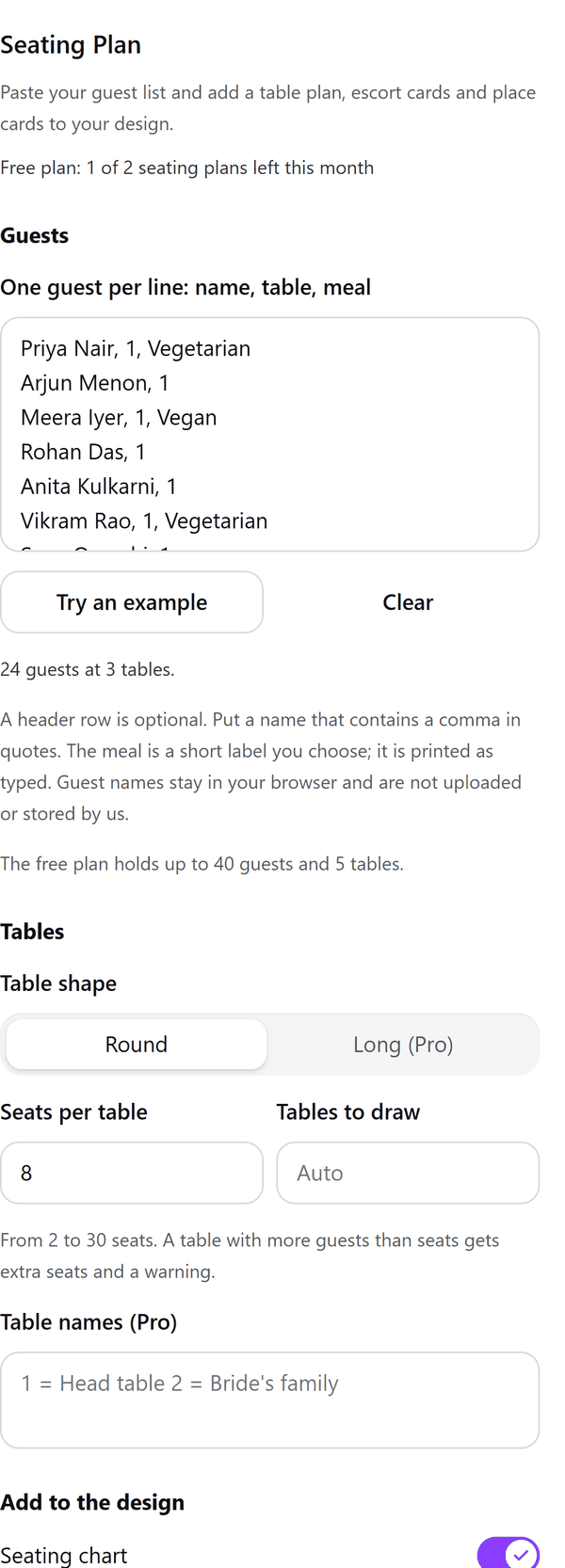
- Reads a guest list you paste, one guest per line as name, table and an optional meal; a header row is optional and a name that contains a comma goes in quotes
- Draws the tables with each guest's name at a seat, and adds escort cards and a table list page if you switch them on. A guest with no table is listed as not seated yet
- Warns you about problems, for example a table with more guests than seats (extra seats are added), an empty table, or a name that appears more than once in the list
- Adds pages to your design in which every name is its own text you can edit; if a page cannot group items, they are added separately and the panel says so
- Pro: long tables, place cards that print the meal label as you typed it, tent-fold cards, table names, a font for the names and bigger parties
How to use it
- Open a design and open Seating Plan from the Apps tab.
- Under Guests paste your list, one guest per line: name, table, meal. Or press Try an example.
- Under Tables choose the table shape and seats per table. Under Add to the design switch on the chart, escort cards or table list page, and choose the paper.
- Look at the Preview, page by page, then press the Add to design button.
Free and Pro
Plan limits reset each calendar month (UTC). Pro is billed through Polar.
| Free | Pro | |
|---|---|---|
| Seating plans a month | 2 | Unlimited |
| Guests and tables | Up to 40 guests, 5 tables | Up to 300 guests, 60 tables |
| Table shape | Round | Round or long |
| Seating chart, escort cards, table list page | Yes | Yes |
| Place cards with meal labels | No | Yes |
| Tent-fold cards | No | Yes |
| Table names | No | Yes |
| Font for names | Your design's font | Your choice |
| Price | $0 | $5 per month or $35 per year |
Manage your Pro licence
You get a licence key by email after you buy Pro. Paste it into the app and press Activate licence. To use the key on another Canva account, press Deactivate this licence first. To restore Pro after a reinstall or on a new device, activate the same key again. To cancel, use the link in your Polar receipt email. Full steps: buying, restoring and managing Pro.
FAQ
How do I write the guest list?
One guest per line: name, table and, if you want one, a meal. The table can be a number or a name. A header row is optional. Put a name that contains a comma in quotes.
What is the meal?
A short label you choose. It is printed as typed on place cards, which are in Pro.
What if a table has more guests than seats?
Extra seats are added and the panel shows a warning, so nobody is left out.
What counts as one seating plan?
Each Add to design is one seating plan, however many pages it spans.
Can I edit the names after adding them?
Yes. Every name is its own text you can edit in Canva. Click into the group to pick one.
Do guest names leave my computer?
No. Guest names stay in your browser and are not uploaded or stored by us. Our server only counts your monthly seating plans.
How do I get help?
Email [email protected] with the app name and a short description of what happened. Do not send your full licence key.
What data does this app keep?
See the Privacy Policy. In short: designs and images stay in your browser; our server keeps your Canva user and brand ids, monthly usage counts and your licence status.