Scripture Plans
A plan page and a daily page for each verse, with lines to write on
What it does
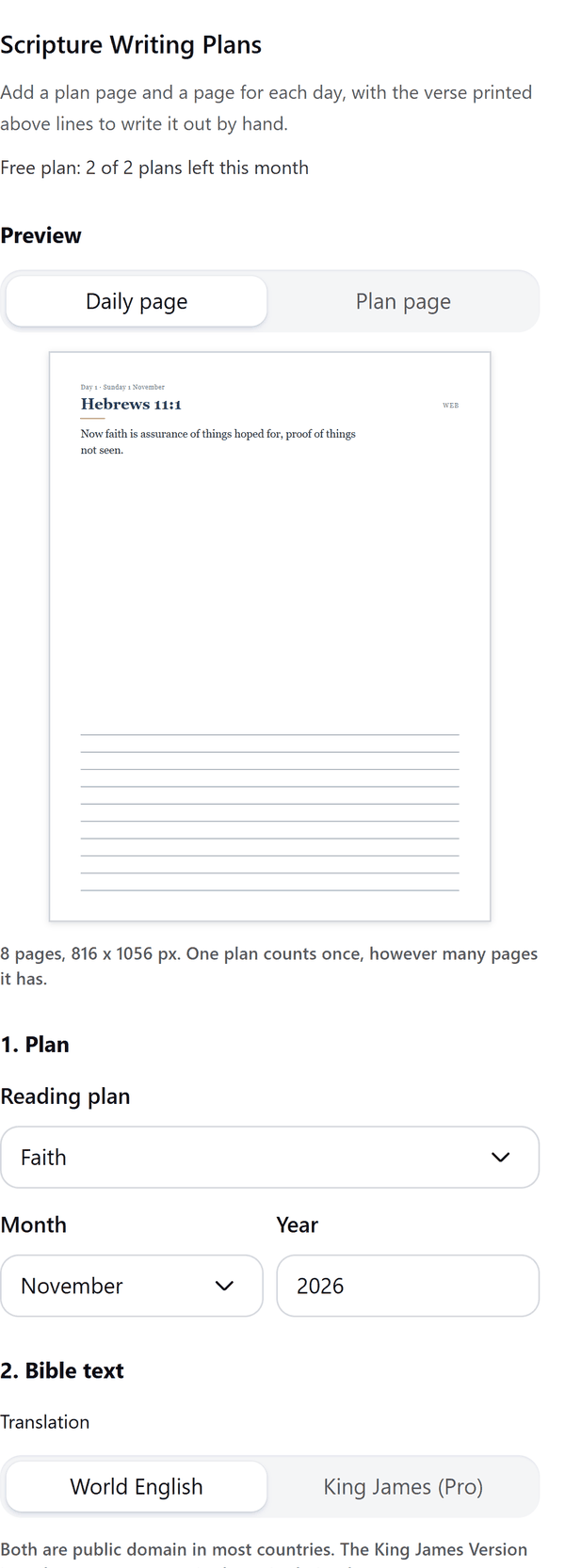
- Adds a plan page that lists the readings and a page for each day, with the verse printed above lines to write it out by hand
- Uses the World English Bible, or the King James Version on Pro, bundled in the app, and prints the translation on the pages
- Lets you choose the month and year, the writing lines, a classic or boxed layout and whether to show verse numbers
- Shows a preview of a daily page, the plan page, a cover and a reflection page
- Keeps an unfinished plan on your device so you can continue from the page where it stopped
- Pro: more plans, your own passages, the whole plan, book sizes and mirrored margins, a cover page and weekly reflection pages
How to use it
- Open a design and open Scripture Plans from the Apps tab.
- Under 1. Plan choose a Reading plan, the Month and the Year. Under 2. Bible text choose the Translation.
- Under 3. Pages choose the Page size, the days to add, the Writing lines and the Layout, and check the Preview.
- Press Add pages. The plan page and the daily pages are added to your design.
Free and Pro
Plan limits reset each calendar month (UTC). Pro is billed through Polar.
| Free | Pro | |
|---|---|---|
| Plans a month | 2 | Unlimited |
| Reading plans | Faith, Peace, Gratitude | Also Hope, Love, Psalms of comfort, Proverbs by date, Psalms by date, Advent, Lent, New Year and your own plan |
| Bible text | World English Bible | Also King James Version |
| Daily pages | The first 7 days | The whole plan |
| Page sizes | US Letter and A4 | Also A5 and book sizes |
| Layout, writing lines and verse numbers | Yes | Yes |
| Mirrored margins, cover page, weekly reflection pages | No | Yes |
| Price | $0 | $5 per month or $35 per year |
Credits
Scripture text: World English Bible (public domain) and King James Version (public domain outside the United Kingdom), both from ebible.org.
Manage your Pro licence
You get a licence key by email after you buy Pro. Paste it into the app and press Activate licence. To use the key on another Canva account, press Deactivate this licence first. To restore Pro after a reinstall or on a new device, activate the same key again. To cancel, use the link in your Polar receipt email. Full steps: buying, restoring and managing Pro.
FAQ
Which Bible texts are included?
The World English Bible (Classic, 2020 stable text) and, on Pro, the King James Version (standard text of 1769), both from ebible.org. Both are public domain in most countries. The King James Version is public domain outside the United Kingdom, where the Crown holds letters patent on printing it.
Can I use my own passages?
Yes, on Pro. Paste one passage per line, such as John 3:16. Add your own wording after a | sign to use it instead of the bundled text.
What if a verse is missing in a translation?
The panel tells you which passages leave out a verse or are not included, and that page shows the reference and a note to write the verse in.
What if my design gets full?
Canva limits the pages in a design. The pages made so far stay in your design. Open a new design and choose Continue from page to add the rest.
Can I edit the verses?
Yes. The verses are ordinary text, so you can restyle or edit them. The writing lines sit at the back of each page.
Does my plan leave my computer?
No. The pages are made in your browser. Our server only counts your monthly plans; one plan counts once, however many pages it has.
How do I get help?
Email [email protected] with the app name and a short description of what happened. Do not send your full licence key.
What data does this app keep?
See the Privacy Policy. In short: designs and images stay in your browser; our server keeps your Canva user and brand ids, monthly usage counts and your licence status.