Ruled Graph Paper
Lined, graph and dot grid pages at a print size
What it does
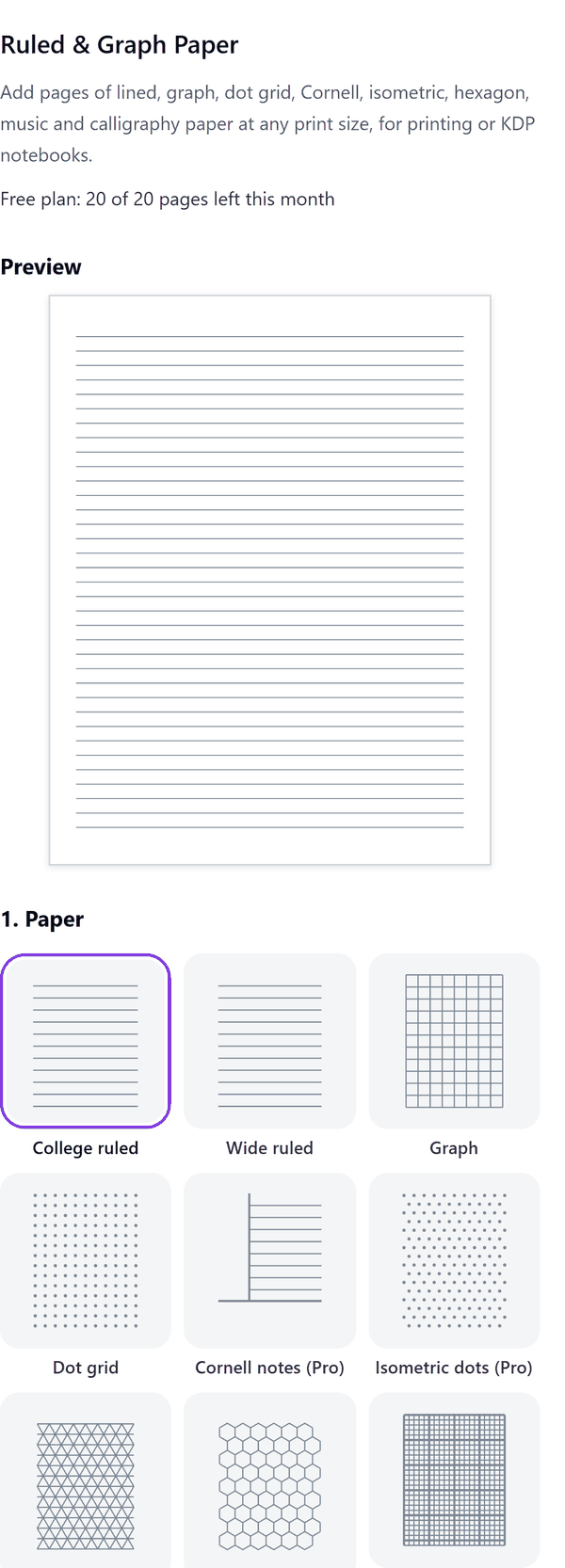
- Draws pages of college ruled, wide ruled, graph and dot grid paper at the page size you choose
- Lets you set the margin, line weight (never thinner than 0.25 pt, so lines still print) and how many pages to add
- Shows a preview of a right-hand and a left-hand page before you add anything
- Adds the pages to your design with the ruling at the back of each page, so you can put text and pictures on top
- Pro: Cornell notes, isometric, hexagon, engineering graph, music staff, calligraphy, polar graph and handwriting paper
- Pro: mirrored margins that add the KDP gutter for your page count, hole-punch guides for 2 holes, 3 holes or discbound (approximate), a header line and page numbers
How to use it
- Open a design and open Ruled & Graph Paper from the Apps tab.
- Under 1. Paper choose a Paper type. Under 2. Page choose a Page size, the number of Pages and the Margin.
- Under 3. Lines set the spacing, line weight and colour, and check the preview.
- Press Add pages. The ruled pages are added to your design.
Free and Pro
Plan limits reset each calendar month (UTC). Pro is billed through Polar.
| Free | Pro | |
|---|---|---|
| Pages a month | 20 | Unlimited |
| College ruled, wide ruled, graph and dot grid | Yes | Yes |
| Cornell, isometric, hexagon, engineering, music, calligraphy, polar and handwriting paper | No | Yes |
| Page sizes | US Letter, A4, 6 x 9 in | Also other KDP trims and A5 |
| Line colour | Grey | Grey, black, blue, green, pink, sepia or your own |
| Custom line spacing | No | Yes |
| Mirrored margins (KDP gutter) | No | Yes |
| Hole-punch guides, header line and page numbers | No | Yes |
| Price | $0 | $5 per month or $35 per year |
Manage your Pro licence
You get a licence key by email after you buy Pro. Paste it into the app and press Activate licence. To use the key on another Canva account, press Deactivate this licence first. To restore Pro after a reinstall or on a new device, activate the same key again. To cancel, use the link in your Polar receipt email. Full steps: buying, restoring and managing Pro.
FAQ
What is the gutter on mirrored margins?
The extra space next to the spine that KDP asks for in a book of your page count. The app adds it to your margin and swaps sides on every page.
Why can lines not be thinner than 0.25 pt?
Finer lines disappear in print and in the KDP preview.
Are the hole-punch positions exact?
The 2 hole and 3 hole guides use standard spacing. The discbound guide is approximate, so check it against your discs.
How many pages can I add at once?
Up to 200 in one run. The free plan makes 20 pages a month.
What if a run stops early?
The pages already added stay in your design. The panel lets you continue from the next page in a new design if Canva's page limit is reached.
Does my design leave my computer?
No. The pages are made in your browser. Our server only counts your monthly pages.
How do I get help?
Email [email protected] with the app name and a short description of what happened. Do not send your full licence key.
What data does this app keep?
See the Privacy Policy. In short: designs and images stay in your browser; our server keeps your Canva user and brand ids, monthly usage counts and your licence status.