Review Cards
A testimonial card for each review you paste
What it does
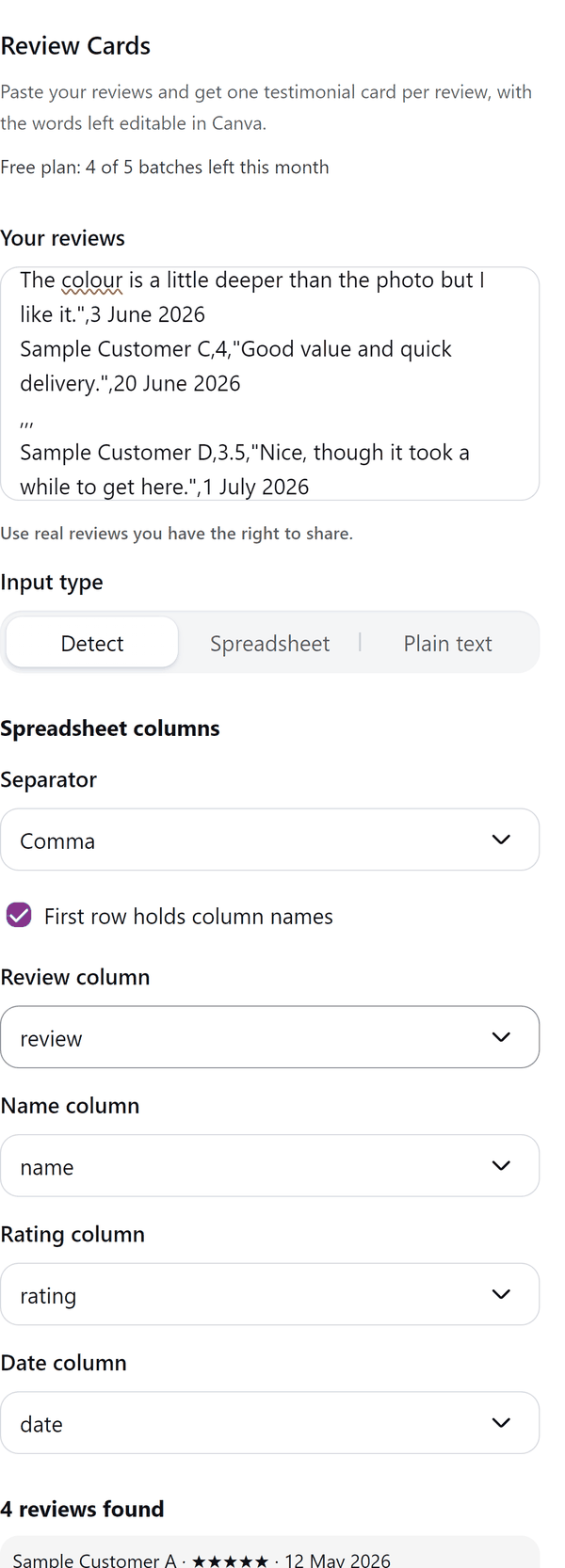
- Reads the text you paste: one review per line, or reviews separated by a blank line, or spreadsheet rows (comma, tab, semicolon or pipe separated) with columns such as name, rating, review and date
- Lets you pick which column is the review, the name, the rating and the date, and shows the reviews it found
- Shows a preview of every card, with Previous and Next, before anything is added
- Adds one page per card to your design. The words are text you can edit; the star row is one picture. If the star picture cannot be added, the cards are added without their stars and the panel says so
- Shortens a review that is too long for its card and tells you; Pro can split it across two cards
- Does not read reviews from any website or account. It uses only the text you paste, and the panel reminds you to use real reviews you have the right to share
- Pro: Story and Wide sizes, Dark and Soft styles, accent colour, font, initials circles, long review splitting and up to 100 cards in a batch
How to use it
- Open a design and open Review Cards from the Apps tab.
- Under Your reviews paste your reviews: one per line, or separated by a blank line, or rows from a spreadsheet. Use real reviews you have the right to share.
- If you pasted spreadsheet rows, check the review, name, rating and date columns. Choose the Size and the Style and look at the Preview.
- Press the Add cards button at the bottom. One page per card is added to your design.
Free and Pro
Plan limits reset each calendar month (UTC). Pro is billed through Polar.
| Free | Pro | |
|---|---|---|
| Batches a month | 5 | Unlimited |
| Cards in a batch | Up to 6 | Up to 100 |
| Sizes | Square | Also Story and Wide |
| Styles | Classic and Bold | Also Dark and Soft |
| Accent colour and font | No | Yes |
| Initials circle | No | Yes |
| Long reviews | Shortened to fit | Shortened, or split across two cards |
| Price | $0 | $5 per month or $35 per year |
Manage your Pro licence
You get a licence key by email after you buy Pro. Paste it into the app and press Activate licence. To use the key on another Canva account, press Deactivate this licence first. To restore Pro after a reinstall or on a new device, activate the same key again. To cancel, use the link in your Polar receipt email. Full steps: buying, restoring and managing Pro.
FAQ
Where do the reviews come from?
You paste them. The app does not read reviews from any website or connect to any account. Use real reviews you have the right to share.
What counts as one batch?
Each press of the Add cards button is one batch. A free batch holds up to 6 cards; Pro batches hold up to 100.
What if a review is too long for its card?
The review is shortened to fit and the panel tells you. With Pro you can switch on Split long reviews across two cards.
How are ratings shown?
A row of stars on the card, from the rating column. Half stars are shown for ratings such as 3.5.
Can I edit a card after adding it?
Yes. The words are text you can edit in Canva. The row of stars is a picture.
Does my text leave my computer?
No. The cards are made in your browser and added to your design through Canva. Our server only counts your monthly batches.
How do I get help?
Email [email protected] with the app name and a short description of what happened. Do not send your full licence key.
What data does this app keep?
See the Privacy Policy. In short: designs and images stay in your browser; our server keeps your Canva user and brand ids, monthly usage counts and your licence status.