Quilt Designer
A traditional block, a quilt top and a cutting list
What it does
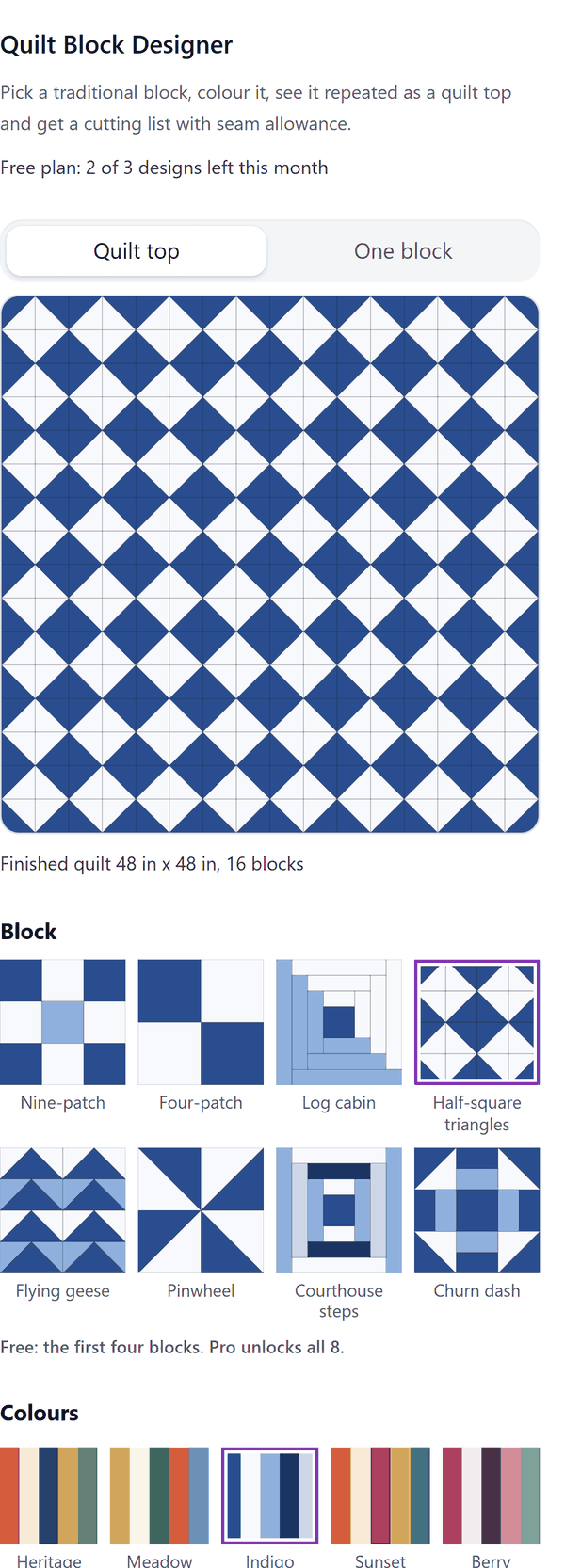
- Shows the block you pick as one block and as a repeated quilt top, in colours you choose for each fabric, with the finished quilt size
- Works out a cutting list for each fabric: the pieces, their finished and cut sizes, how many per block and in all, and how to cut them, with the seam allowance you choose
- Uses cutting sizes that follow common quilting practice, rounded to the nearest 1/8 in (or 1 mm). Make a test block before you cut all your fabric
- Adds pattern pages (a block picture, the quilt top, a fabric key and the cutting list), or just a block picture or a quilt picture. The pictures are vector images, and the fabric key and cutting list are text you can edit
- Pro: four more blocks, bigger quilts, sashing, a border, turned blocks and metric sizes
How to use it
- Open a design and open Quilt Block Designer from the Apps tab.
- Pick a block, pick a colour set and change any fabric colour. Set the block size, seam allowance and how many blocks across and down.
- Look at the Quilt top and One block views and the cutting list.
- Press the Add pattern pages button, or add just the block picture or the quilt picture.
Free and Pro
Plan limits reset each calendar month (UTC). Pro is billed through Polar.
| Free | Pro | |
|---|---|---|
| Designs a month | 3 | Unlimited |
| Blocks | 4: Nine-patch, Four-patch, Log cabin, Half-square triangles | All 8 |
| Blocks across and down | Up to 4 x 4 | Up to 12 x 12 |
| Sashing, cornerstones, border | No | Yes |
| Turned blocks | No | Yes |
| Units | Inches | Inches or metric |
| Fabric colours, fabric key and cutting list | Yes | Yes |
| Price | $0 | $5 per month or $35 per year |
Manage your Pro licence
You get a licence key by email after you buy Pro. Paste it into the app and press Activate licence. To use the key on another Canva account, press Deactivate this licence first. To restore Pro after a reinstall or on a new device, activate the same key again. To cancel, use the link in your Polar receipt email. Full steps: buying, restoring and managing Pro.
FAQ
Are the cutting sizes exact?
They follow common quilting practice and are rounded to the nearest 1/8 in (or 1 mm). Squares get twice the seam allowance added and triangles a little more. Make a test block first, because fabric, seams and cutting differ.
What counts as one design?
A design is one set of choices. Adding the same design again, for example as pattern pages and then as a picture, does not use another one.
Can I change the colours?
Yes. Pick a colour set or set each fabric colour yourself. The fabric key shows the colours you chose.
Which blocks are free?
The first four: Nine-patch, Four-patch, Log cabin and Half-square triangles. Pro unlocks all 8.
Can I edit the pages after adding them?
The block and quilt pictures are vector images. The fabric key and cutting list are text you can edit.
Does my design leave my computer?
No. It is made in your browser and added to your design through Canva. Our server only counts your monthly designs.
How do I get help?
Email [email protected] with the app name and a short description of what happened. Do not send your full licence key.
What data does this app keep?
See the Privacy Policy. In short: designs and images stay in your browser; our server keeps your Canva user and brand ids, monthly usage counts and your licence status.