Puzzle Book Maker
A whole puzzle book at a print size, with solution pages
What it does
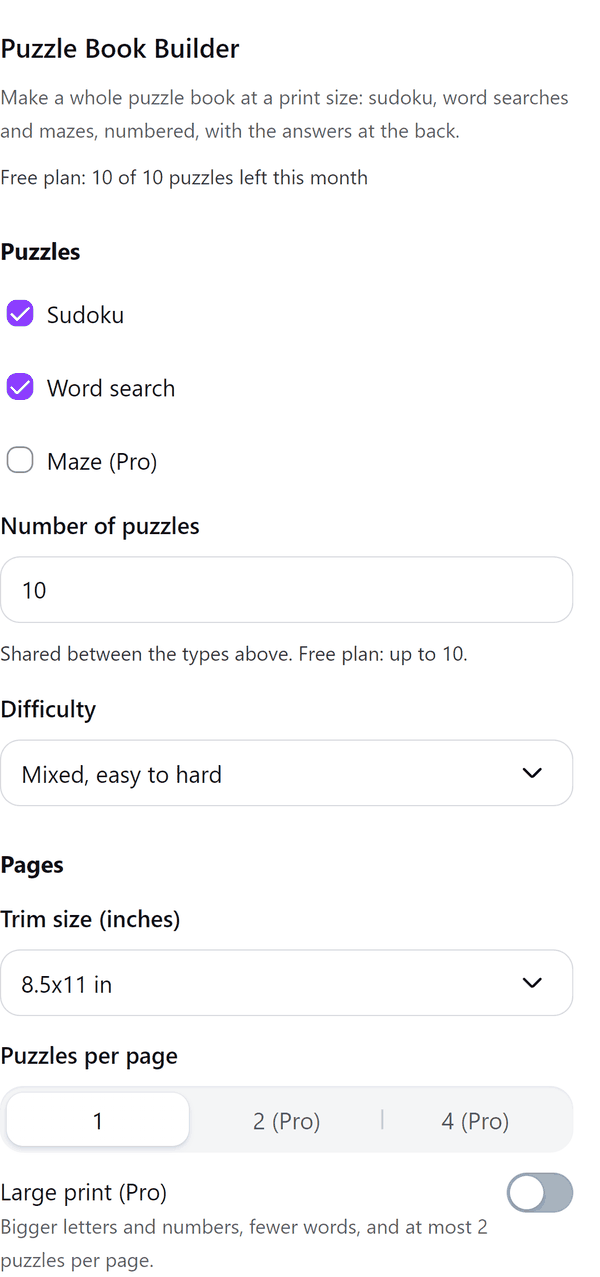
- Makes sudoku, word search and maze puzzles in your browser and shows the first page in a preview
- Splits the number of puzzles evenly between the types you choose, at one difficulty or a mix that climbs from easy to hard
- Writes the pages at the trim size you choose and tells you if the book has fewer than the 24 pages KDP needs or more than the 828 it prints
- Uses a seed, so the same seed and settings always make the same book; New seed makes a different one
- Pro: a solutions section at the back, numbered puzzles and difficulty sections, large print, 2 or 4 puzzles per page, other word lists and your own words
How to use it
- Open a design and open Puzzle Book Maker from the Apps tab.
- Under Puzzles tick the types, then type the Number of puzzles and choose a Difficulty.
- Under Pages choose the Trim size and Puzzles per page.
- Press Make the puzzles. Your book shows the first page, the page count and the trim size.
- Press the Add pages button, for example Add 10 pages to the design. The pages are added to your design.
Free and Pro
Plan limits reset each calendar month (UTC). Pro is billed through Polar.
| Free | Pro | |
|---|---|---|
| Puzzles a month | 10 | Unlimited, up to 300 a book |
| Sudoku and word search | Yes | Yes |
| Mazes | No | Yes |
| Trim size | 8.5 x 11 in | 5 x 8 to 8.5 x 11 in |
| Puzzles per page | 1 | 1, 2 or 4 |
| Large print | No | Yes |
| Solutions section, numbering and difficulty sections | No | Yes |
| Word lists | Animals | Other themes or your own words |
| Price | $0 | $6 per month or $39 per year |
Manage your Pro licence
You get a licence key by email after you buy Pro. Paste it into the app and press Activate licence. To use the key on another Canva account, press Deactivate this licence first. To restore Pro after a reinstall or on a new device, activate the same key again. To cancel, use the link in your Polar receipt email. Full steps: buying, restoring and managing Pro.
FAQ
Does each sudoku have one answer?
Yes. Every sudoku is checked to have exactly one solution.
Will the same settings give the same book?
Yes. The seed and the settings decide the book. Press New seed for a different one.
Do the answer pages use my monthly puzzles?
No. Solution pages hold no puzzles and cost no allowance. The Solutions section is a Pro option.
Is the book ready for KDP?
The pages are made at the trim size you choose. KDP prints paperbacks of 24 to 828 pages, and the panel warns you if your book is outside that range. Check the result against your platform's rules before you publish.
Does my book leave my computer?
No. The puzzles are made in your browser. Our server only counts your monthly puzzles.
What if Canva stops taking pages?
The pages already added stay in your design and the panel says how many were added.
How do I get help?
Email [email protected] with the app name and a short description of what happened. Do not send your full licence key.
What data does this app keep?
See the Privacy Policy. In short: designs and images stay in your browser; our server keeps your Canva user and brand ids, monthly usage counts and your licence status.