Planner Stickers
Printable sticker sheets with boxes packed to fit your planner
What it does
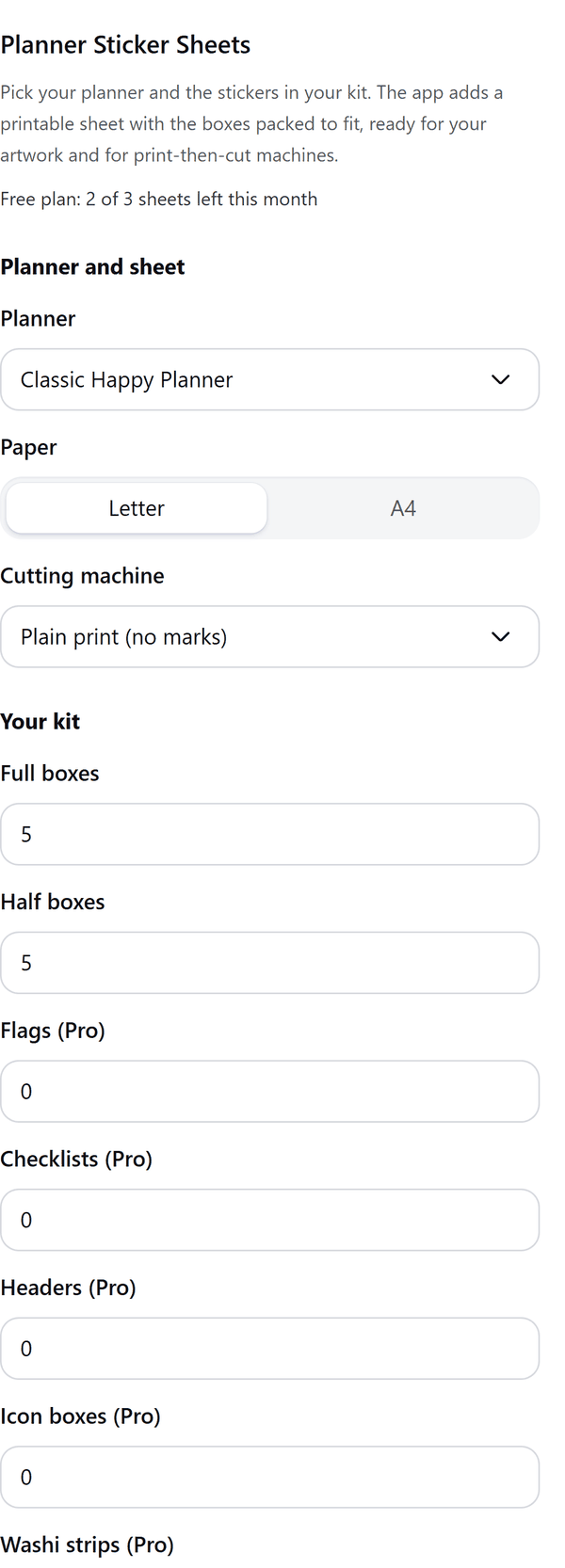
- Packs the boxes in your kit onto a Letter or A4 page at true size, with the margin, gap and corner radius you choose
- Offers box sizes for the Happy Planner, Erin Condren and Hobonichi Weeks and for a standard weekly layout
- Shows a live preview of the sheet and how many stickers fit; stickers that do not fit are listed and left out
- Adds the sheet as a new page where each sticker is its own shape, so you can drop your artwork into it
- Pro: more planners and sticker types, Cricut and Silhouette layouts and a cut-line file for cutting machines
How to use it
- Open a design and open Planner Stickers from the Apps tab.
- Choose your Planner, the Paper size and the Cutting machine, then set how many of each sticker you want under Your kit.
- Check the Preview and the line that says how many stickers fit on the sheet.
- Press Add sticker sheet. A new page with the sticker shapes is added. Drop your artwork into the shapes and print at 100 percent, never fit to page.
Free and Pro
Plan limits reset each calendar month (UTC). Pro is billed through Polar.
| Free | Pro | |
|---|---|---|
| Sheets a month | 3 | Unlimited |
| Planners | Classic Happy Planner and a standard weekly planner | Also Mini and Big Happy Planner, Erin Condren vertical and horizontal, Hobonichi Weeks |
| Sticker types | Full boxes and half boxes | Also flags, checklists, headers, icon boxes, washi strips, circle dots, hexagon dots and custom size boxes |
| Paper | Letter and A4 | Letter and A4 |
| Cutting machine layout | Plain print, no marks | Also Cricut print then cut and Silhouette print and cut |
| Cut-line SVG file | No | Yes |
| Price | $0 | $5 per month or $35 per year |
Manage your Pro licence
You get a licence key by email after you buy Pro. Paste it into the app and press Activate licence. To use the key on another Canva account, press Deactivate this licence first. To restore Pro after a reinstall or on a new device, activate the same key again. To cancel, use the link in your Polar receipt email. Full steps: buying, restoring and managing Pro.
FAQ
Are the box sizes exact?
Not always. They come from sticker makers' size lists, not from the planner companies, and the panel marks sizes it could not confirm as approximate. Measure a box in your own planner before you print a full run.
Do the Cricut and Silhouette layouts need a test cut?
Yes. Layout values for the machines are approximate and machines change. Test cut one sheet on plain paper first, and print at 100 percent with no fit-to-page.
What happens if my kit does not fit?
The panel shows Not everything fits and lists the stickers that were left out. Choose fewer or smaller stickers, or reduce the margin.
What is the cut-line file?
An SVG file with one cut line per sticker at true size in inches. It is a Pro option. If downloads are blocked in your browser, the SVG text is copied so you can paste it into a file ending in .svg.
Does my design leave my computer?
No. The sheet is made in your browser. Our server only counts your monthly sheets.
Are Happy Planner, Erin Condren and Hobonichi official partners?
No. Their names only describe which box sizes the app offers.
How do I get help?
Email [email protected] with the app name and a short description of what happened. Do not send your full licence key.
What data does this app keep?
See the Privacy Policy. In short: designs and images stay in your browser; our server keeps your Canva user and brand ids, monthly usage counts and your licence status.