Match Day Graphics
Match day and result posts from a pasted list
What it does
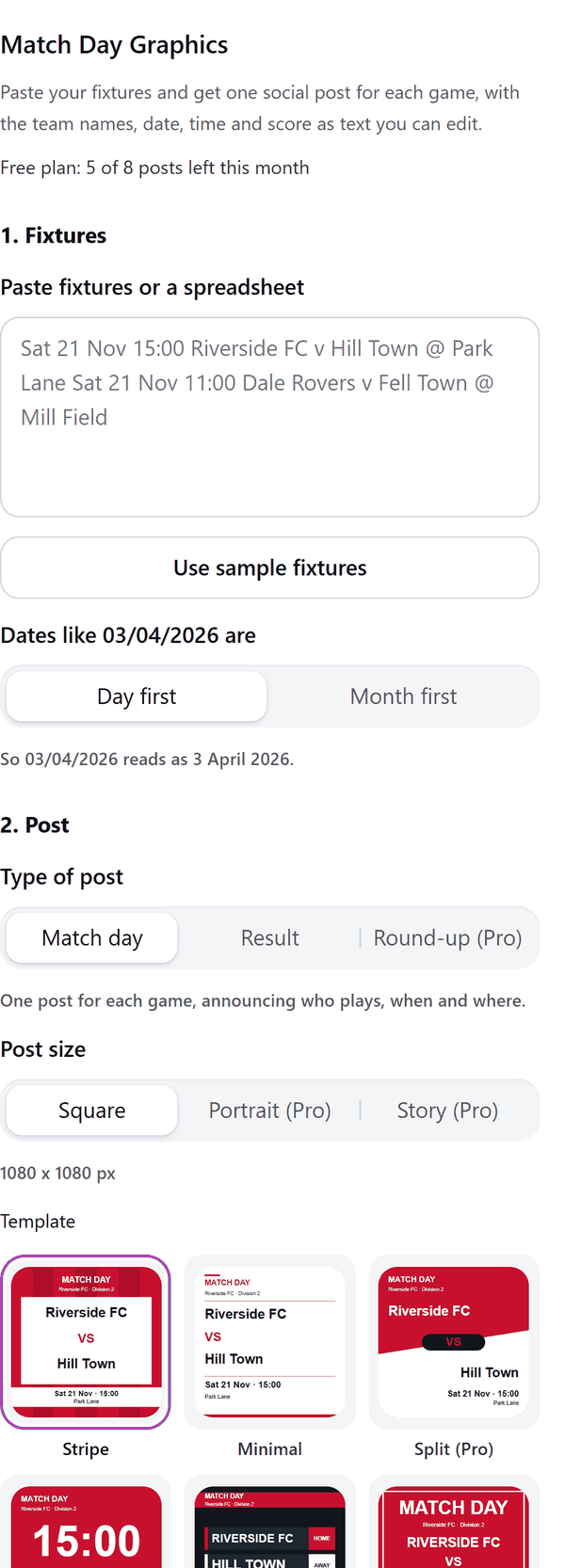
- Reads a fixtures list pasted as text, one game per line, or a table copied from a spreadsheet: a date, a time, the two teams, a ground after an @ sign, an optional competition name in brackets and, for results, a score such as 2-1
- Lets you say whether a date such as 03/04/2026 is day first or month first, shows how the first date reads, and lists any line it could not read
- Adds one page per post: a match day post, a result post that says win, draw or loss from your team name, or (Pro) a round-up that lists up to eight games
- Puts every name, score, date and time on the post as a text box you can edit; a name too long for its space is shortened with an ellipsis and you can type the full name back in
- Uses one of eight ready colour pairs or your own two colours, and (Pro) a second pair for away games, a crest from your own selected image and a sponsor line
- Uses no logos or league names; the only picture on a post is a crest you choose yourself
How to use it
- Open a design and open Match Day Graphics from the Apps tab.
- Paste your fixtures into the box under Fixtures, or press Use sample fixtures to try it. Check the date order and the first date shown.
- Under Post pick the type of post, the size and the look. Under Your club type your team name and pick your colours.
- Under Games to include tick the games you want, then press the Add posts to design button.
Free and Pro
Plan limits reset each calendar month (UTC). Pro is billed through Polar.
| Free | Pro | |
|---|---|---|
| Posts a month | 8 | Unlimited |
| Types of post | Match day and Result | Match day, Result and Round-up |
| Looks | 2: Stripe and Minimal | All 6 |
| Sizes | Square | Square, Portrait and Story |
| Posts in one go | 1 | Up to 40 |
| Crest, away colours, sponsor line | No | Yes |
| Colours, date order, editable text | Yes | Yes |
| Price | $0 | $5 per month or $35 per year |
Manage your Pro licence
You get a licence key by email after you buy Pro. Paste it into the app and press Activate licence. To use the key on another Canva account, press Deactivate this licence first. To restore Pro after a reinstall or on a new device, activate the same key again. To cancel, use the link in your Polar receipt email. Full steps: buying, restoring and managing Pro.
FAQ
How do I enter my fixtures?
Paste one game per line, for example 21 Nov 15:00 Riverside FC v Hill Town @ Park Lane, or paste a table copied from a spreadsheet. Lines the app cannot read are listed with their line numbers.
Are there any club or league logos?
No. The posts use only your text and colours. A crest appears only if you select your own image in the design and press Use selected image as crest (Pro).
How does the app decide win, draw or loss?
Type your team name under Your club. On a result post the app compares it with the home and away team and the score, and prints win, draw or loss.
Can I change the words after adding a post?
Yes. Every name, score, date and time is a text box. Click it to change the words, or pick a new font and colour in Canva.
What counts as one post?
Each page the app adds is one post. A round-up lists up to eight games on one post, so it uses one post for every eight games.
Does my crest image leave my computer?
No. The app places the image you select on your posts through Canva. It is not sent to our servers. Our server only counts your monthly posts.
How do I get help?
Email [email protected] with the app name and a short description of what happened. Do not send your full licence key.
What data does this app keep?
See the Privacy Policy. In short: designs and images stay in your browser; our server keeps your Canva user and brand ids, monthly usage counts and your licence status.