Listing Image Set
A set of listing images from one product photo, sized for the marketplace
What it does
- Reads the product photo you select on your page and checks it: a background, a small photo or a product that cannot be measured get a note
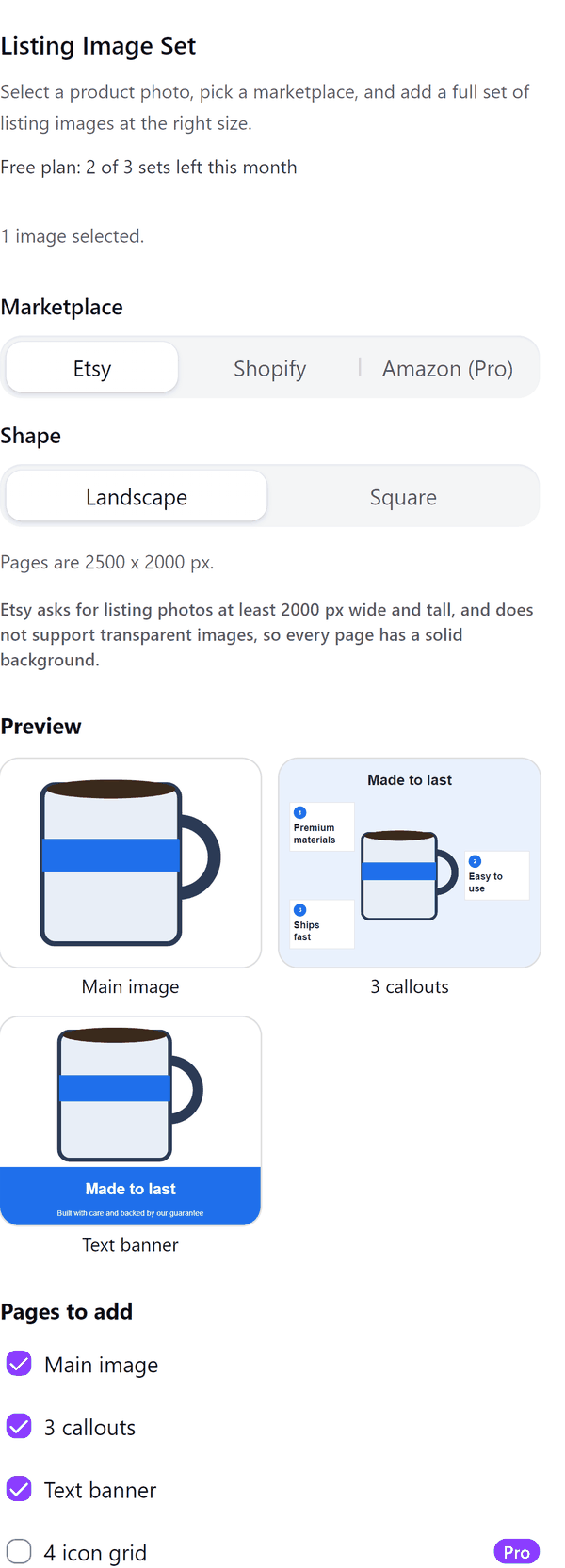
- Lays out the pages you tick at the marketplace size: Etsy landscape 2500 x 2000 px or square 2000 x 2000 px, Shopify 2048 x 2048 px, Amazon 2000 x 2000 px
- Adds the pages to your design with all text editable in Canva
- Lets you type the headline, second line, features and comparison points, and enter width, height and depth for the dimensions page
- On the Amazon preset sizes the product to about 85 percent of the frame as a target and warns when the background is not pure white
- Pro: more page types, Amazon, brand colour and font and a set for every selected photo
How to use it
- Open a design, add your product photo and click it so it is selected, then open Listing Image Set from the Apps tab.
- Choose the Marketplace and the Shape, then tick the Pages to add.
- Type your text under Text on the pages and check the Preview of each page.
- Press Add pages. The pages are added to your design.
Free and Pro
Plan limits reset each calendar month (UTC). Pro is billed through Polar.
| Free | Pro | |
|---|---|---|
| Sets a month | 3 | Unlimited |
| Marketplace sizes | Etsy and Shopify | Also Amazon |
| Page types | Main image, 3 callouts, text banner | Also 4 icon grid, dimensions, lifestyle frame, comparison, before and after |
| Your own text on the pages | Yes | Yes |
| Brand colour and font | No | Yes |
| Photos per run | The first selected photo | Every selected photo |
| Price | $0 | $5 per month or $35 per year |
Manage your Pro licence
You get a licence key by email after you buy Pro. Paste it into the app and press Activate licence. To use the key on another Canva account, press Deactivate this licence first. To restore Pro after a reinstall or on a new device, activate the same key again. To cancel, use the link in your Polar receipt email. Full steps: buying, restoring and managing Pro.
FAQ
Which sizes does each marketplace get?
Etsy asks for listing photos at least 2000 px wide and tall, so Etsy pages are 2500 x 2000 or 2000 x 2000 px with a solid background. Shopify shows square images best at 2048 x 2048 px.
What about Amazon?
Amazon main images need a pure white background. The 85 percent product fill and the 2000 x 2000 px size are targets the app uses, not requirements it can confirm. Check Amazon's image guide for your category.
Does the photo need a clear background?
It works best with a cut-out. If the photo has a background, run Canva's background remover on it and select it again; the panel tells you.
Can I edit the text afterwards?
Yes. All the text on the pages is editable in Canva. Text is shortened if it does not fit; use shorter lines to keep all of it.
How many photos can I do at once?
The free plan makes a set for the first selected photo. Pro makes a set for every selected photo.
Does my photo leave my computer?
No. The pages are made in your browser. Our server only counts your monthly sets.
How do I get help?
Email [email protected] with the app name and a short description of what happened. Do not send your full licence key.
What data does this app keep?
See the Privacy Policy. In short: designs and images stay in your browser; our server keeps your Canva user and brand ids, monthly usage counts and your licence status.