Handwriting Sheets
Tracing pages with dotted letters on ruled lines
What it does
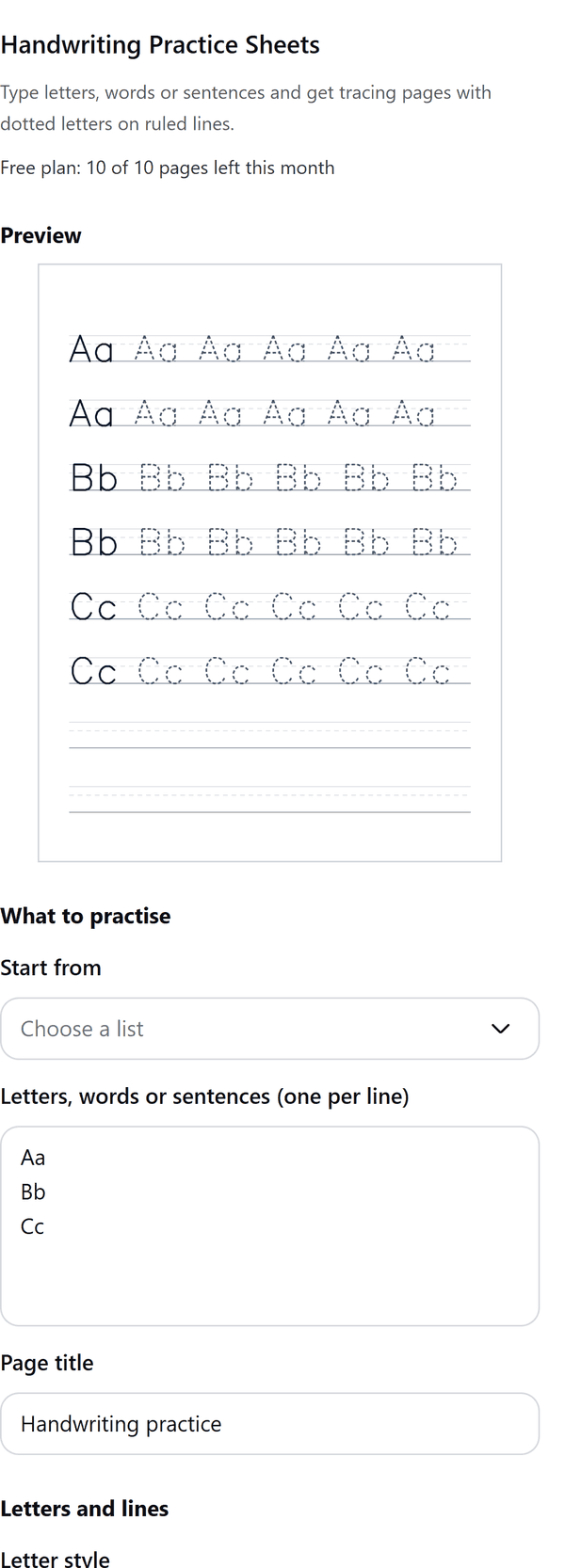
- Turns the words you type, one line each, into tracing pages: a solid model letter, then copies drawn as dotted lines on ruled lines
- Offers ready lists for capital letters, lowercase letters, numbers 0 to 9 and common sight words
- Lets you choose the ruling (3 lines, 4 lines or a base line), the letter height, the rows per page and the copies per row
- Shows a preview of the first page and adds the pages to your design; each page is a picture of the lines and letters, with the title as text you can edit
- Pro: cursive letters, numbered start dots and stroke arrows that follow the stroke, fading rows, slanted print letters, blue and red ruled lines, a name and date line, book page sizes and one word per page
- Draws English letters, numbers and common punctuation only; characters it cannot draw are listed and left out
How to use it
- Open a design and open Handwriting Sheets from the Apps tab.
- Under Start from choose a list, or type your own letters, words or sentences in the box, one per line.
- Choose the Ruled lines, the Letter height and the Paper size, and check the preview of the first page.
- Press Add pages. The pages are added to your design. Edit the page title in Canva if you want a different one.
Free and Pro
Plan limits reset each calendar month (UTC). Pro is billed through Polar.
| Free | Pro | |
|---|---|---|
| Pages a month | 10 | Unlimited |
| Print letters with dotted tracing | Yes | Yes |
| Cursive letters | No | Yes |
| Numbered start dots and stroke arrows | No | Yes |
| Fading rows | No | Yes |
| Slanted letters and blue and red ruled lines | No | Yes |
| Name and date line | No | Yes |
| Page sizes | US Letter and A4 | Also book trim sizes |
| One word per page | No | Yes |
| Price | $0 | $5 per month or $35 per year |
Credits
Hershey fonts by Dr. A. V. Hershey (U.S. National Bureau of Standards), with the format by James Hurt (Cognition, Inc.).
Manage your Pro licence
You get a licence key by email after you buy Pro. Paste it into the app and press Activate licence. To use the key on another Canva account, press Deactivate this licence first. To restore Pro after a reinstall or on a new device, activate the same key again. To cancel, use the link in your Polar receipt email. Full steps: buying, restoring and managing Pro.
FAQ
Which letters can it draw?
English letters, numbers 0 to 9 and common punctuation. Other characters are listed in the panel and left out.
Where do the letter shapes come from?
The letters are single-line (stroke) letters from the Hershey fonts. Hershey fonts by Dr. A. V. Hershey (U.S. National Bureau of Standards), with the format by James Hurt (Cognition, Inc.).
Can I change the title on the pages?
Yes. The title is text in your design, so you can edit it in Canva. The lines and letters are a picture.
What if a long run stops?
The pages already added stay in your design. The panel shows Continue from page and lets you carry on in a new design if Canva's page limit is reached.
Is this ready for an activity book?
Pro has book page sizes with safe margins for print on demand. Check the result against your platform's rules before you publish.
Does my text leave my computer?
No. The pages are made in your browser. Our server only counts your monthly pages.
How do I get help?
Email [email protected] with the app name and a short description of what happened. Do not send your full licence key.
What data does this app keep?
See the Privacy Policy. In short: designs and images stay in your browser; our server keeps your Canva user and brand ids, monthly usage counts and your licence status.