Garden Planner
A square-foot garden plan, crop list and sowing calendar
What it does
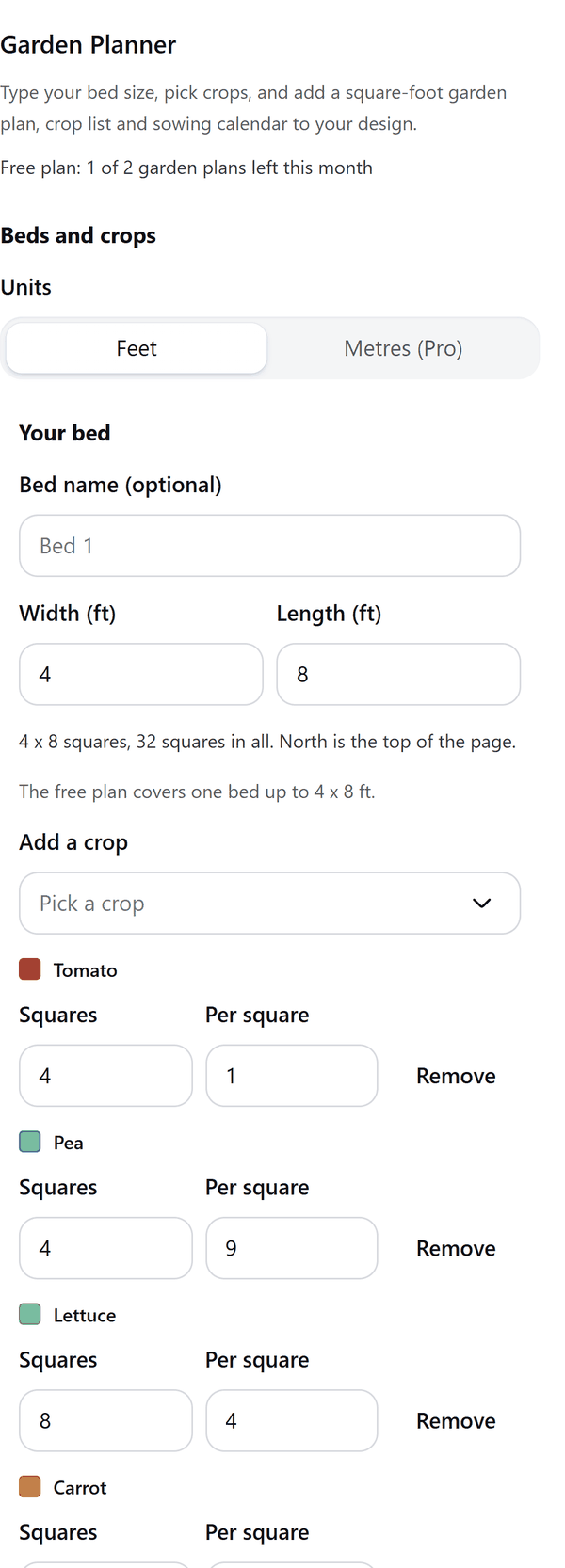
- Draws a grid of squares for each bed and fills it from the crops you pick, with the plants per square starting at the common square-foot spacing, which you can change
- Counts the plants for each crop and warns you when you ask for more squares than a bed has
- Puts tall crops on the north (top) edge of the bed if you leave that switch on, so they do not shade the others
- Adds a garden plan page, a crop list and, with Pro, a sowing calendar, in which every name and number is text you can edit. Weeks count from the last frost date you type
- Shows spacing and dates as common practice, not rules: the pages say to check your seed packet
- Pro: more beds and crops, crops of your own with your own timing, metric sizes and the sowing calendar
How to use it
- Open a design and open Garden Planner from the Apps tab.
- Under Beds and crops type the bed width and length, then use Add a crop to pick crops and say how many squares each one takes.
- Under Add to the design switch on the pages you want. If you switch on the sowing calendar, pick your last frost date.
- Choose the paper, look at the Preview, then press the Add to design button.
Free and Pro
Plan limits reset each calendar month (UTC). Pro is billed through Polar.
| Free | Pro | |
|---|---|---|
| Garden plans a month | 2 | Unlimited |
| Beds | One bed up to 4 x 8 ft | Up to 4 beds, each up to 24 squares a side |
| Crops | 12 | All 40, and up to 6 of your own |
| Garden plan page and crop list | Yes | Yes |
| Sowing calendar | No | Yes |
| Sizes in | Feet | Feet or metres |
| Paper | A4 or Letter | A4 or Letter |
| Price | $0 | $5 per month or $35 per year |
Manage your Pro licence
You get a licence key by email after you buy Pro. Paste it into the app and press Activate licence. To use the key on another Canva account, press Deactivate this licence first. To restore Pro after a reinstall or on a new device, activate the same key again. To cancel, use the link in your Polar receipt email. Full steps: buying, restoring and managing Pro.
FAQ
Are the spacing and sowing dates reliable?
They are common practice, not rules. Plants per square follow the common square-foot method and sowing weeks are common practice. Check your seed packet and local advice. Every value can be changed in the panel.
Does it promise a harvest?
No. It lays out a plan and a calendar to work from. Yields and results depend on your climate, soil and care.
How do I set the sowing dates?
Type the date you usually see the last frost. Weeks count from it: -6 is 6 weeks before and 2 is 2 weeks after. The app does not look up weather or frost dates.
Can I edit the plan after adding it?
Yes. Every name and number is text you can edit in Canva. The beds and crop colours are shapes.
What counts as one garden plan?
Each press of Add to design is one garden plan, however many pages it adds.
Does my plan leave my computer?
No. Nothing you type leaves your browser. Our server only counts your monthly garden plans.
How do I get help?
Email [email protected] with the app name and a short description of what happened. Do not send your full licence key.
What data does this app keep?
See the Privacy Policy. In short: designs and images stay in your browser; our server keeps your Canva user and brand ids, monthly usage counts and your licence status.