Family Tree Chart
A family tree chart from a list you paste
What it does
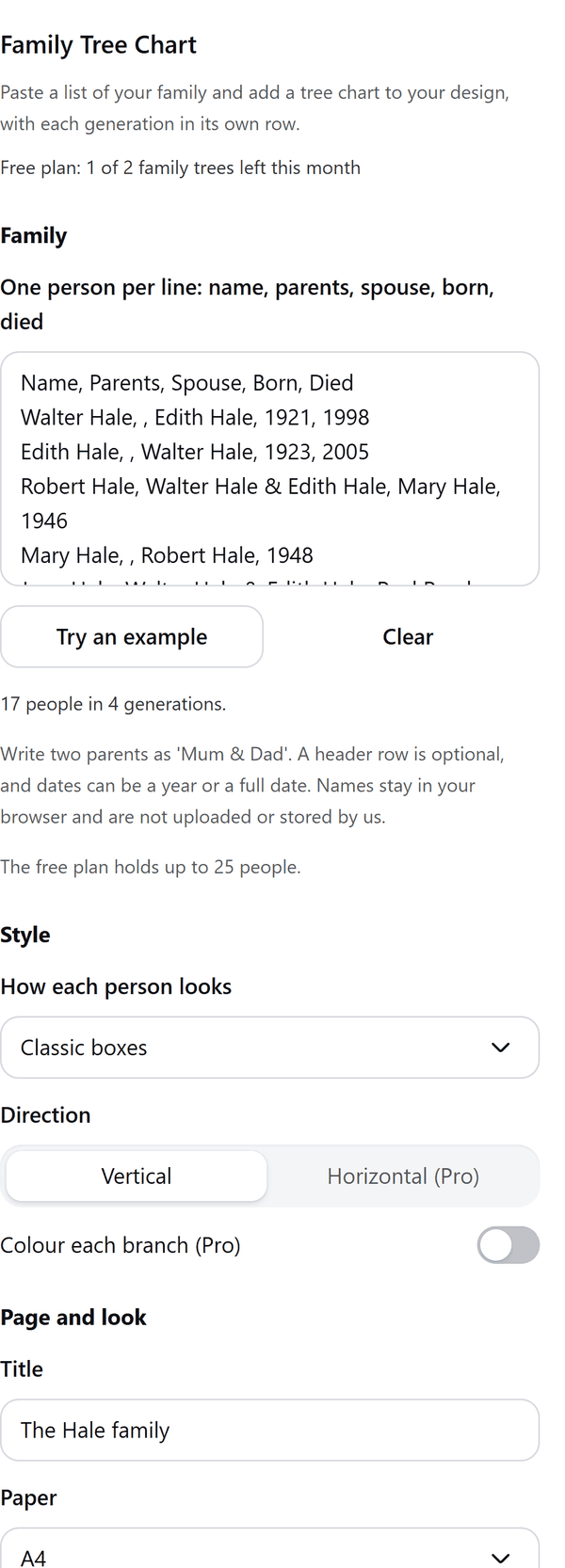
- Works from a list you paste or type, one person per line: name, parents, spouse, born, died. A header row is optional, two parents are written as Mum & Dad, and dates can be a year or a full date
- Does not search records or connect to any family history website. It draws only the people in your list
- Draws each generation in its own row, with a preview you can page through, and splits a family that is too wide for one page by branch, with a note on each page saying where it continues
- Warns you about problems in the list: a name that appears more than once, a parent with no line of their own, a person listed as their own parent or in a loop of parents, and people with no links
- Adds the tree with every name as text you can edit. With many people the boxes and lines go in as one picture and the names stay as text
- Pro: more styles, a horizontal tree, a colour for each branch, poster sizes and up to 300 people
How to use it
- Open a design and open Family Tree Chart from the Apps tab.
- Under Family paste your list, one person per line: name, parents, spouse, born, died. Or press Try an example.
- Under Style choose how each person looks and the direction. Under Page and look set the title, paper and font.
- Look at the Preview, page by page, then press the Add to design button.
Free and Pro
Plan limits reset each calendar month (UTC). Pro is billed through Polar.
| Free | Pro | |
|---|---|---|
| Family trees a month | 2 | Unlimited |
| People | Up to 25 | Up to 300 |
| Styles | Classic boxes | Also rounded cards with years, portrait circles and a compact list |
| Direction | Vertical | Vertical or horizontal |
| Colour each branch | No | Yes |
| Paper | A4 or Letter | Also A3, A2, 18 x 24 in and 24 x 36 in posters |
| Font for names | Yes | Yes |
| Price | $0 | $5 per month or $35 per year |
Manage your Pro licence
You get a licence key by email after you buy Pro. Paste it into the app and press Activate licence. To use the key on another Canva account, press Deactivate this licence first. To restore Pro after a reinstall or on a new device, activate the same key again. To cancel, use the link in your Polar receipt email. Full steps: buying, restoring and managing Pro.
FAQ
Does it find my relatives or look up records?
No. It works only from the list you paste or type. It does not search records or connect to any family history website.
How do I write the list?
One person per line: name, parents, spouse, born, died. Write two parents as Mum & Dad. A header row is optional. Dates can be a year or a full date.
What if my family is large?
The Free plan holds up to 25 people and Pro up to 300. A tree that is too wide for one page is split by branch, and each page says where it continues.
Can I edit the names after adding them?
Yes. Every name is its own text you can edit in Canva. Click into the group to pick one.
What counts as one family tree?
Each press of Add to design is one family tree, however many pages it adds.
Do the names leave my computer?
No. Names stay in your browser and are not uploaded or stored by us. Our server only counts your monthly family trees.
How do I get help?
Email [email protected] with the app name and a short description of what happened. Do not send your full licence key.
What data does this app keep?
See the Privacy Policy. In short: designs and images stay in your browser; our server keeps your Canva user and brand ids, monthly usage counts and your licence status.