Box Dieline Maker
A true size flat box template with cut, fold and glue lines
What it does
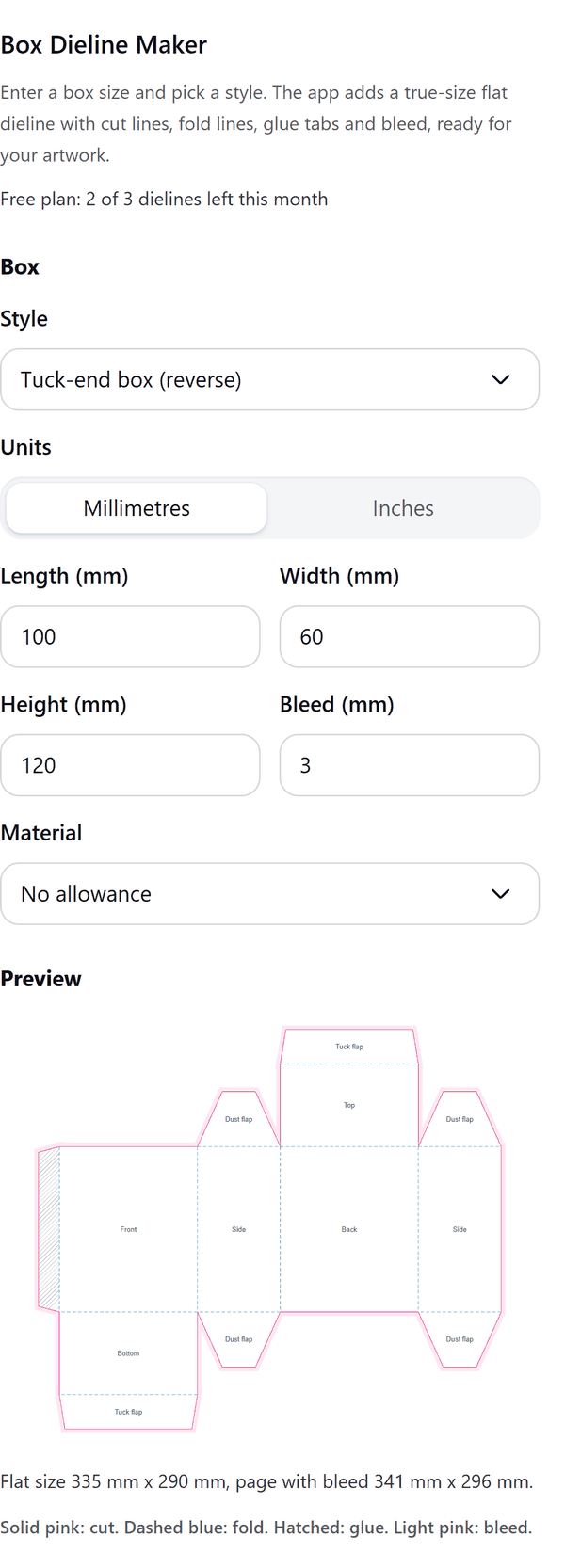
- Draws a flat box template at true size from the length, width and height you enter, in millimetres or inches
- Marks cut lines, fold lines, glue tabs and bleed, and labels each panel
- Adds the dieline to your design as a new page sized to the flat template plus bleed
- Can add an artwork guide that outlines each panel so you can place artwork panel by panel
- Shows the flat size, each panel size and which sheet sizes it fits (A4, Letter, A3, Tabloid, 12 x 18 in), with a button to copy the summary
- Pro: more box styles, envelopes, a material thickness allowance, your own bleed and a cut-line only SVG file for cutters
How to use it
- Open a design and open Box Dieline Maker from the Apps tab.
- Choose a Style and the Units, then type the Length, Width and Height of the box. Check the preview.
- Press Add dieline page. A new page with the flat template is added to your design.
- Optional: turn on Add artwork guide before you add the page, or press Copy summary to paste the sizes into your printer's form.
- Print a test on plain paper and fold it before you order boxes.
Free and Pro
Plan limits reset each calendar month (UTC). Pro is billed through Polar.
| Free | Pro | |
|---|---|---|
| Dielines a month | 3 | Unlimited |
| Tuck-end (reverse) and mailer boxes | Yes | Yes |
| Other box styles (straight tuck-end, auto-lock bottom, pillow, sleeve, lid and base, gable) | No | Yes |
| Envelopes (C6, DL, A7, custom size) | No | Yes |
| Material thickness allowance | No | Yes |
| Bleed | 3 mm | 0 to 10 mm |
| Artwork guide and printer summary | Yes | Yes |
| Cut-line only SVG file | No | Yes |
| Price | $0 | $6 per month or $39 per year |
Manage your Pro licence
You get a licence key by email after you buy Pro. Paste it into the app and press Activate licence. To use the key on another Canva account, press Deactivate this licence first. To restore Pro after a reinstall or on a new device, activate the same key again. To cancel, use the link in your Polar receipt email. Full steps: buying, restoring and managing Pro.
FAQ
Are the sizes inside or outside sizes?
The length, width and height you type are the inside size of the box. Pro can add an allowance for the thickness of your card.
Will the box close when I print it?
Fold and glue a test on plain paper first. Flap and tab sizes follow common practice. If your printer supplies its own dieline for your box, use theirs.
What is the cut file for?
It holds only the cut lines, for a cutting machine or a die maker. It is a Pro option. If downloads are blocked in your browser, the SVG is copied so you can paste it into a file.
Can I use inches?
Yes. Switch Units to Inches and your values keep the same physical size.
Does my design leave my computer?
No. The template is made in your browser. Our server only counts your monthly dielines.
Is this for printing addresses on envelopes?
No. The envelope styles draw the flat envelope shape to print on. They do not print addresses.
How do I get help?
Email [email protected] with the app name and a short description of what happened. Do not send your full licence key.
What data does this app keep?
See the Privacy Policy. In short: designs and images stay in your browser; our server keeps your Canva user and brand ids, monthly usage counts and your licence status.